


Free
Free
A practical starting point for a single remote server workspace. No credit card required.
1 server connection
- File explorer and editor tabs
- Browser terminal access
- Robbie built-in help included

AI-powered server management
Browser-based workspace for agencies, freelancers, and WordPress developers managing real SSH servers. Robbie AI runs health checks, investigates problems automatically, and prepares safe remediation plans — nothing executes without your approval.
Switching from Codeanywhere? See the migration guide →
Free
Plan to start
No card required
Any SSH
Server works
No hosting migration
30s
First health check
After connecting
0
Auto-executions
You approve every fix
AI workspace root
Set any folder as the AI workspace root and the assistant reads only that scope — no guesswork about which files are relevant. Every fix, explanation, and diff is grounded in the code you're actually working on.
Explorer
Core product
Open the active file in a VS Code-style dashboard, keep multiple tabs visible, and move across split panels without losing context.
Browse server files, open them instantly, download what you need, and run terminal commands beside the code you are changing.
Use AI to explain logs, open files, selected code, and config; suggest safer fixes or refactors; generate commands; review changes; and outline rollback-aware next steps.
Work across wp-config files, themes, plugins, PHP errors, Apache rules, and Nginx issues from one browser-first workspace.
Switch between client environments, keep maintenance work moving, and give your team a calmer way to handle urgent fixes.
Draft landing pages, components, markdown briefs, and lightweight browser projects with live preview, share links, and fork flows before deployment exists.
Pair file changes with logs, terminal context, AI review, and visible support flows so production work stays easier to reason about.
See it in action
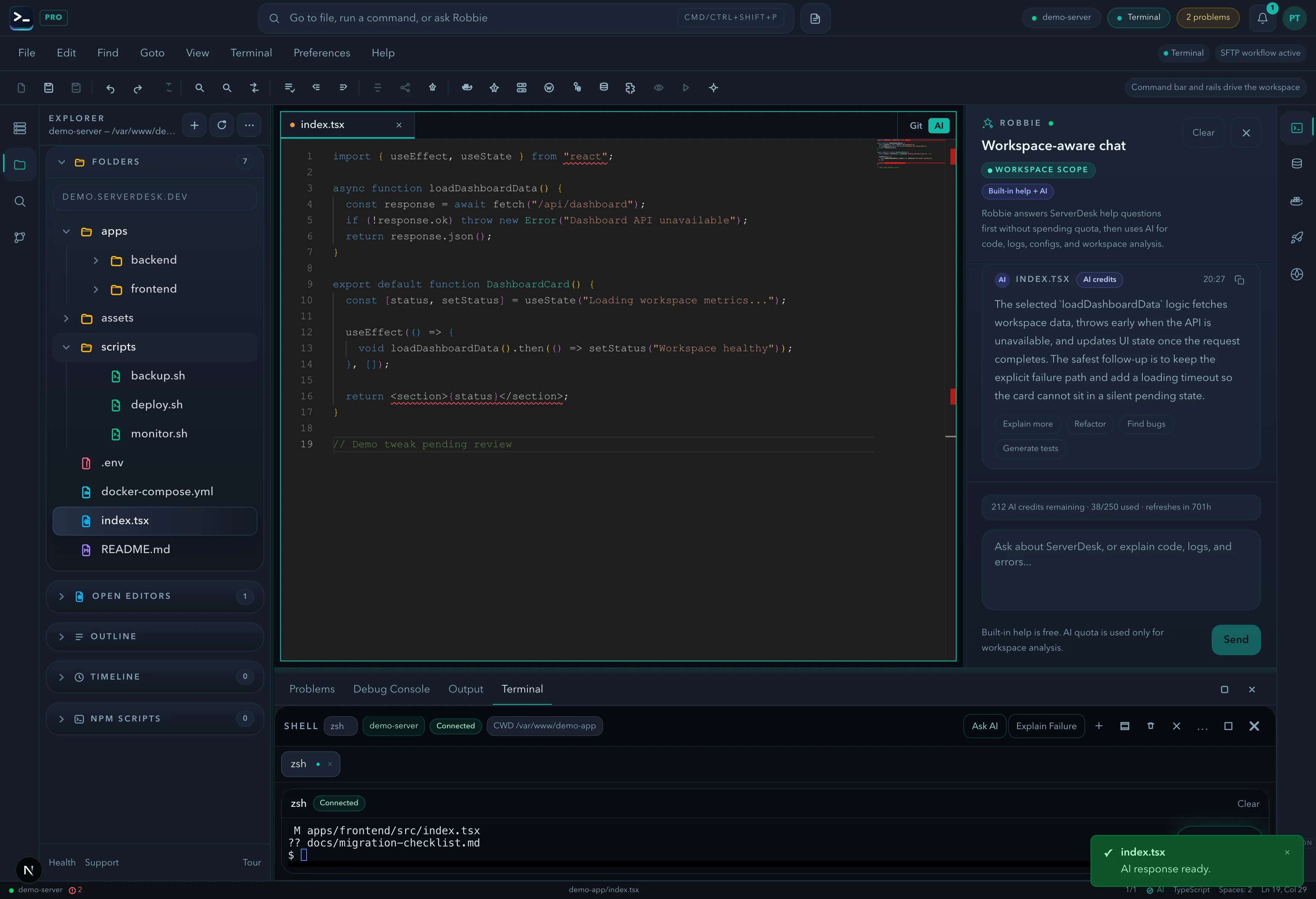
File explorer, code editor, live terminal, and Robbie AI — all connected to your server, all in the same workspace.
How it works
No DevOps expertise required. No commands memorised. Robbie does the analysis — you make the decisions.
Add your SSH or SFTP credentials. ServerDesk validates the connection and opens the workspace. Nothing is installed on your server.
Works with any Linux server, VPS, or shared hosting with SSH access.
Robbie runs a full health check: system resources, Docker containers, application logs, database performance, and git status.
Guardian then monitors continuously — detecting problems as they develop.
Each finding comes with a confidence score, root cause explanation, and the affected systems. No jargon — plain language.
Findings ranked by severity. The most critical issue is always shown first.
Robbie prepares a step-by-step remediation plan. Each step is dry-run verified and reversible. Nothing runs until you approve it.
You stay in control. Robbie never executes anything automatically.
Why developers switch
Explorer, Monaco editing, terminal, Docker, databases, and Robbie live in one workspace that feels closer to real operations than a lightweight file manager.
ServerDesk connects to the infrastructure developers already run instead of forcing a hosting move or a platform-specific environment.
The core product works on its own. Robbie becomes valuable when a team needs help interpreting logs, code, config, or risky production changes.
Support routes, billing pages, AI credit rules, migration help, changelog visibility, and real workflow screens are public instead of hidden behind sales claims.
What Robbie does while you sleep
This is a real incident pattern — Redis OOM kills, detected and investigated automatically. You wake up to a fix plan, not a 3am page.
Memory pressure climbs past threshold. Swap is active.
Redis container has restarted 5 times. OOM kill pattern identified.
Correlating container logs, system metrics, and process history.
Redis has no memory limit. OOM killer terminates it every 40 minutes.
Two reversible commands. Dry-run verified. Awaiting your approval.
Takes 90 seconds. Redis has not restarted since.
How ServerDesk compares
ServerDesk is the only browser-based server workspace that includes AI investigation, Guardian monitoring, and approval-based remediation alongside the file editor and terminal you already use.
| Feature | ServerDeskthis | Codeanywhere | Termius | VS Code SSH | SSH only |
|---|---|---|---|---|---|
| Works in any browser | ✓ | ✓ | — | — | — |
| SSH terminal | ✓ | ✓ | ✓ | ✓ | ✓ |
| SFTP file editor | ✓ | ✓ | ◐ | ◐ | — |
| Monaco code editor | ✓ | ✓ | — | ✓ | — |
| Docker management | ✓ | ◐ | — | ◐ | — |
| Database explorer | ✓ | — | — | ◐ | — |
| AI health check | ✓ | — | — | — | — |
| Automatic investigation | ✓ | — | — | — | — |
| Guardian monitoring | ✓ | — | — | — | — |
| Approval-based remediation | ✓ | — | — | — | — |
| No local install required | ✓ | ✓ | — | — | — |
| Free plan available | ✓ | ◐ | ◐ | ✓ | ✓ |
| Active development | ✓ | — | ✓ | ✓ | n/a |
How Robbie works
Robbie is an analysis tool, not an operator. Its job is to understand your server, prepare a safe fix, and wait. Your job is to review and decide. This is not a limitation — it is the design.
Observe
Robbie connects to your server over SSH and reads diagnostic output — system metrics, process lists, log excerpts, Docker status. No file contents are read unless you ask.
Analyse
The diagnostic text is sent to the AI model for analysis. Robbie correlates patterns across metrics, logs, and process state to identify the most likely root cause.
Prepare
Robbie assembles a remediation plan: a sequence of specific commands, each with a dry-run output, expected outcome, estimated risk, and rollback instructions.
Wait
Robbie stops. The plan is shown to you. Nothing is executed. No timer. No auto-approve. Robbie waits indefinitely until you take action.
You Review
You read the plan at your own pace. You can expand each step, view the dry-run output, read the rollback procedure, and check the risk rating before approving anything.
You Approve
You approve each step individually. There is no single "approve all" button. Each step requires a deliberate action from you. You can stop at any step.
Execute
Only after your explicit step-by-step approval does Robbie run the command on your server. The output is shown in real time. If anything looks wrong, stop and roll back.
Robbie never executes changes on your server without a step-by-step approval from you. There is no auto-approve mode. There is no way to enable one.
AI for real work
ServerDesk positions AI as an operator-side tool, not decoration. The assistant helps explain the issue, explain the current file or selected code, inspect the affected config, suggest safer fixes, generate commands, and think through the change before it reaches production.
Meet the AI Team
Proof and trust
Support
General, billing, and sales replies target 1 business day. Security reports are acknowledged within 24 hours.
Credentials
Server credentials are stored encrypted at rest and normal customer flows do not expose plaintext secrets.
Ownership
Your code and production data stay on your servers. ServerDesk connects to infrastructure you already control.
Billing
Cancel before renewal from Billing. Purchased AI credits do not expire and are used only after monthly credits run out.
Listed on SourceForge & SaaSHub
Independent software profiles and reviews. Third-party listings available alongside the product pages on this site.
Built for your workflow
The problem
“My production logs are full of cryptic PHP errors and I don't know which one broke the site.”
The solution
Robbie reads the logs, identifies the root cause, and explains it in plain language — without you having to grep through 10,000 lines.
The result
Fix production issues 5× faster. No SSH knowledge required beyond the connection.
Pricing
ServerDesk pricing is designed around the workflow teams actually buy: how many servers they need to manage, how many people are involved, and when Robbie analysis, monthly AI credits, and safer review workflows become valuable.
Free
A practical starting point for a single remote server workspace. No credit card required.
1 server connection
$9/month
For freelancers and maintainers handling a few active server environments.
3 server connections
$19/month
For developers and operators who need deeper AI-assisted server work, deployments, and source control.
10 server connections
$39/month
For power users managing more environments with a higher monthly AI allowance and priority support.
Unlimited server connections
$79/month
For agencies managing many client environments with higher monthly AI usage and account oversight.
Unlimited server connections
Actively shipped
Release 1
Explorer now shows clearer icons, safer previews, and Open Editors below the file tree.
Release 2
Terminal and connection states are clearer, with reconnect handling that avoids endless spinners.
Release 3
Robbie routes product questions through built-in help first so teams save paid AI credits for real analysis.
Explore the product
Follow how ServerDesk is positioning the browser-first server workspace, AI-assisted troubleshooting, and team-oriented remote editing workflows.
See how Robbie and the specialist AI Team turn one prompt into a workspace-aware answer.
See how ServerDesk positions a browser-first server workspace for teams who need speed and clarity.
Follow the next milestones for editor depth, AI support, collaboration, and server workflows.
Track public-facing product updates as the workspace evolves.
Review how support, AI guidance, and troubleshooting workflows fit together.
Security and trust
ServerDesk is built with a clear principle: AI provides the analysis, humans make the decisions. No automatic execution. No hidden commands. No surprises.
Robbie never executes anything without your explicit approval. Every fix is reviewed by you before a single command runs.
The remediation flow requires a deliberate approval step. There is no auto-execute mode — by design.
Server credentials are stored encrypted at rest. Normal customer flows never expose plaintext secrets in logs or responses.
ServerDesk connects to infrastructure you already control. Your code, files, and production data never move to our servers.
AI analysis provides recommendations and confidence scores. Final decisions are always yours. Robbie is an assistant, not an operator.
Before you approve anything, Robbie shows you how to reverse it. Rollback steps are generated alongside every remediation plan.
ServerDesk is new. There are no fake reviews here, no inflated user counts, no borrowed testimonials. We are looking for the first group of real users who will use the product on real servers and tell us honestly what works and what does not.
In return: direct access to the team, a permanent founding discount, and the satisfaction of building something with people who will actually listen.
Free plan available. No card required. Cancel any time.
Your account is permanently marked as a founding member. Recognised in the product and in the changelog.
A direct email route to the team — not a support ticket queue. Your feedback reaches the people building the product.
Early adopters vote on what gets built next. Your real-world use cases directly influence the product direction.
Early adopters receive a discount that persists as long as the account remains active. The earlier you join, the better the rate.
Ready to try the workflow?
Validate the workspace fast, compare pricing clearly, review the documentation, and use the contact route as the current path for demo conversations.