Skip to content
Simple, transparent pricing

Clear pricing for a browser-firstserver workspace

Choose the plan that fits your remote server workload, team size, and need for Robbie analysis, monthly AI credits, and deployment support.

Built for agencies managing many client environments
Useful for freelancers doing ongoing maintenance and urgent fixes
Practical for WordPress, PHP, Apache, and Nginx support work
Browser-first workflow that still feels familiar to VS Code users

Free

Free

A practical starting point for a single remote server workspace. No credit card required.

  • 1 server connection
  • VS Code-style browser workspace
  • SSH and SFTP access
  • File manager
  • Monaco editor
  • Browser terminal access
  • Database explorer (read-only)
  • Robbie built-in help (no AI credits needed)
  • Single user seat
Start free

Starter

$9/mo

For freelancers and maintainers handling a few active server environments.

  • 3 server connections
  • Everything in Free
  • Database explorer (full access)
  • Docker management
  • WordPress toolkit
  • 100 AI credits per month
  • Email support
Choose Starter

Studio

$39/mo

For power users managing more environments with a higher monthly AI allowance and priority support.

  • Unlimited server connections
  • Everything in Pro
  • 1,500 AI credits per month
  • AI credit top-ups
  • Priority support
  • Higher monthly AI allowance
Choose Studio

Agency

$79/mo

For agencies managing many client environments with higher monthly AI usage and account oversight.

  • Unlimited server connections
  • Everything in Studio
  • 3,000 AI credits per month
  • Bring your own API key
  • Advanced admin controls
  • Audit logs
  • Dedicated support
Choose Agency

AI across plans

Robbie stays one assistant experience while the AI depth grows with the plan.

This is not separate AI packaging. Every plan keeps the same Robbie experience, then expands the amount of provider-backed analysis and workspace intelligence available to that conversation.

Meet Robbie and the AI Team

Free

Basic AI

Robbie answers built-in product and workflow questions without touching paid AI credits.

Starter

Larger context

Starter adds monthly AI credits so Robbie can explain files, logs, and practical maintenance issues with more real workspace context.

Pro

Workspace intelligence

Pro is where Robbie starts to feel like an engineering teammate across files, terminal output, deployments, and Git-backed change review.

Studio

Advanced AI workspace

Studio expands the monthly AI allowance for teams running deeper AI-assisted workflows across more environments.

Agency

Full AI experience

Agency is the highest-capacity Robbie setup, with the biggest allowance, BYOK support, and oversight features for client-heavy teams.

Billing & credits

Understand exactly what you're paying for before you commit

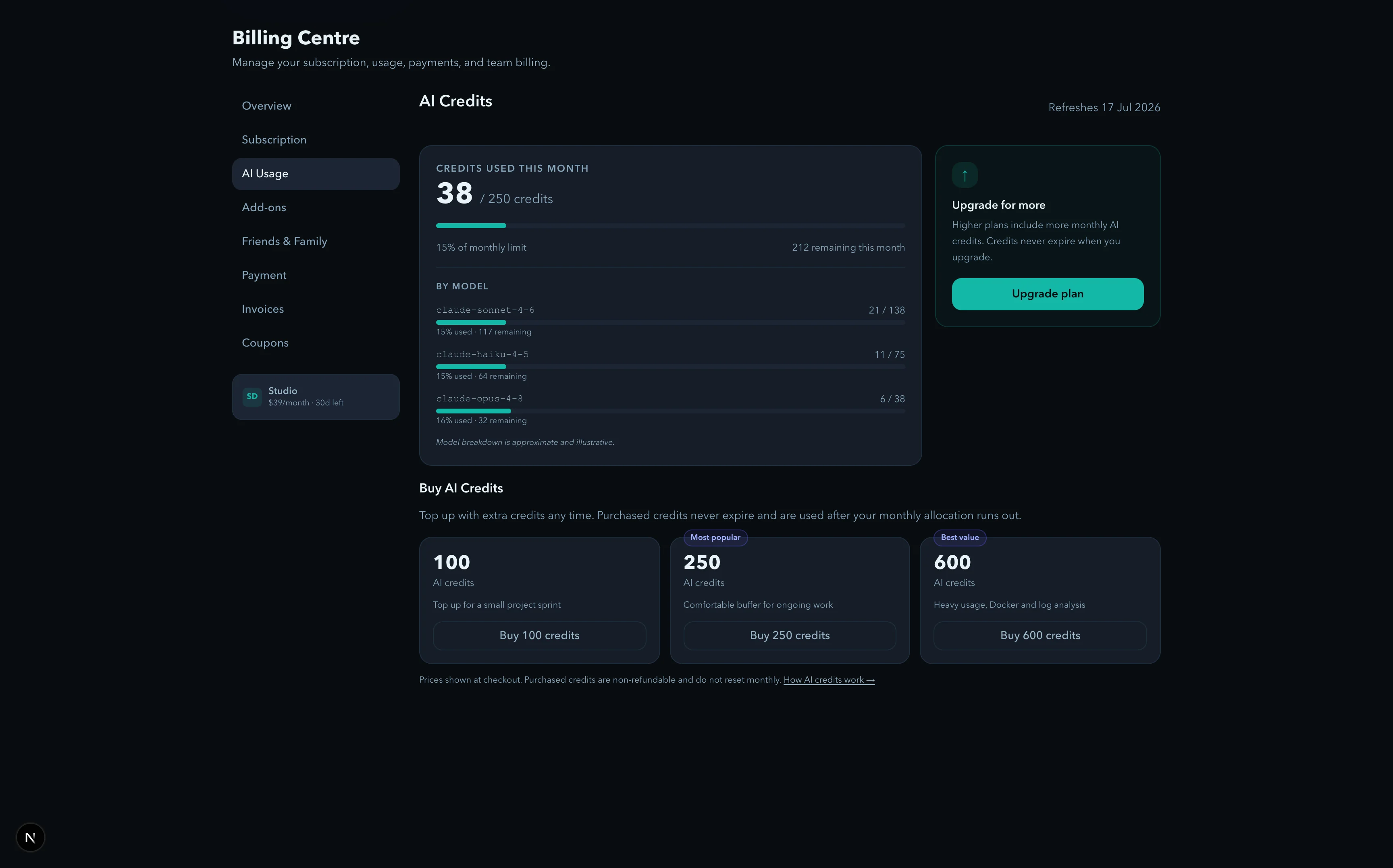
Plans, monthly AI credits, and optional credit packs are all visible in one place. No hidden meters, no surprise charges.

ServerDesk · Billing plans and AI creditsLive screenshot
ServerDesk billing page showing plan tiers, monthly AI credits, and purchased credit packs
This mirrors the live billing story: understand the plan, verify what AI does, then buy more only when usage justifies it.

How Robbie credits work

Built-in help is free — AI analysis uses credits only when it helps

Robbie answers product questions at no cost. Code review, log analysis, and deeper AI tasks draw from your monthly credit allowance.

Built-in help

Ask Robbie how to connect a server, configure SFTP, manage billing, or migrate from Codeanywhere — none of that touches your AI credits.

AI analysis

Ask Robbie to explain a function, diagnose a terminal error, or review a config file — those tasks draw from your monthly credit allowance.

Top up

When monthly credits run out, purchased credit packs kick in automatically. They never expire and are used only after your monthly allowance is exhausted.

serverdesk.dev · guided product demolooping

Active step

Product questions never use credits

Built-in help

Ask Robbie how to connect a server, configure SFTP, manage billing, or migrate from Codeanywhere — none of that touches your AI credits.

Transcript

Robbie · How do I connect my server?

Built-in help route selected

No paid AI credits used

Suggested next step: open the connection wizard.

Real usage estimates

How many credits will you actually use?

Credits are only consumed when Robbie sends output to the AI model for analysis. Product questions and navigation help are free. Here is a realistic guide based on typical workflows.

ActionCredits
Product question (how do I connect a server?)0
Health check (full server diagnostic)5–15
Log file analysis3–10
Investigation (root cause analysis)10–25
Code review or file explanation3–10
Remediation plan generation5–15

Monthly estimate by profile

Solo Developer

Manages 1–2 personal or client servers. Runs health checks when something feels off. Occasional code review during fixes.

  • 2–3 health checks per month
  • Log analysis during incidents
  • Code explanation for unfamiliar files
~30–60 credits/monthStarter

Agency Owner

Manages 5–10 client servers. Runs weekly health checks across all clients. Guardian monitors continuously and triggers investigations when patterns emerge.

  • Weekly health checks across all servers
  • 1–3 investigations per month
  • Log analysis during client incidents
  • Remediation plans when needed
~150–350 credits/monthPro

Freelancer

Manages 3–5 client servers. Runs health checks before maintenance windows and after deployments. Uses Robbie for log analysis during urgent fixes.

  • Health check before each maintenance window
  • Log analysis during emergency fixes
  • Occasional code explanation for legacy code
~60–120 credits/monthStarter or Pro

Estimates assume typical usage. Actual credit usage varies by server complexity, log volume, and analysis depth. Read the full AI credits FAQ →

Codeanywhere migration offerLimited time offer

50% off your first 3 months

For Codeanywhere users moving their workflow to ServerDesk. Valid on any paid plan. New accounts only.

Coupon code

CODEANYWHERE

Use this at checkout for 50% off the first 3 months on any paid plan.

Migration guide →

Pricing trust

Trust signals buyers can verify

Cancel

Paid plans renew until cancelled before the next renewal date. Billing stays self-serve through the customer portal.

Credits

Built-in Robbie help stays free. Paid AI credits are used only for provider-backed analysis of code, files, logs, and runtime issues.

Ownership

You keep your hosting, servers, and deployment path. ServerDesk layers a browser workspace on top of infrastructure you already control.

Support

Billing and support questions target a reply within 1 business day, with dedicated security and privacy routes published publicly.

Listed on SourceForge & SaaSHub

Independent software profiles and third-party reviews.

  • Explain Apache, Nginx, PHP, and WordPress logs in plain language
  • Explain the current open file, selected code, a function, or a class before editing
  • Inspect remote files or config and suggest safe next steps
  • Help teams understand unfamiliar legacy PHP, JS, CSS, HTML, or WordPress code
  • Generate commands for diagnostics, cache clears, and deployment checks
  • Generate comments or documentation for selected code and compare files or versions
  • Review planned changes, identify risky code before saving, and describe likely impact before you deploy
  • Outline rollback steps so the team has a safer operating plan

Plan comparison

CapabilityFreeStarterProStudioAgency
Server connections1310UnlimitedUnlimited
AI credits per monthNone100/mo500/mo1,500/mo3,000/mo
VS Code-style workspaceYesYesYesYesYes
SSH and SFTP workflowsYesYesYesYesYes
Terminal accessYesYesYesYesYes
Database explorerRead-onlyFullFullFullFull
Docker managementYesYesYesYes
WordPress toolkitYesYesYesYes
AI credit top-upsYesYesYes
DeploymentsYesYesYes
Source controlYesYesYes
Bring your own API keyYes
Audit logsYes
SupportCommunityEmailPriority emailPriorityDedicated
Cancel or change plans from the billing area without contacting sales.
Monthly AI credits are shown in Billing and Robbie before you hit the limit.
Purchased AI credits never expire and are used after your monthly allocation.
Support, billing, privacy, and security routes are published with response expectations.

Frequently asked questions

Ready to move

Compare plans, start free, and keep the upgrade path simple.

ServerDesk pricing stays readable: validate the workspace first, expand into deeper AI and multi-server work later, and keep documentation and support visible throughout evaluation.