
Codeanywhere alternative
Codeanywhere alternative for teams who still need SSH, SFTP, terminal, and practical AI help.
Developers are looking for Codeanywhere alternatives now because they need a replacement that keeps their existing servers usable. ServerDesk is a modern browser workspace for real servers: Explorer, editor, terminal, Docker, databases, billing support, and Robbie AI in one responsive dashboard.
What is happening
Closed
New signups
Codeanywhere has closed registration. New accounts can no longer be created.
June 30, 2026
Export deadline
Existing users have until June 30 to download their projects, files, and credentials.
July 1, 2026
Service ends
Codeanywhere goes offline. After this date, access to workspaces and files is permanently closed.
Codeanywhere was one of the first browser-based cloud IDEs and served many developers well over the years. If you are one of those users, the goal here is to give you a practical path forward — not to make a point about what is ending.
Migration checklist
A practical list of what to do before June 30. Most migrations take under 30 minutes for a straightforward setup.
- 1
Keep your existing server
You do not need to move hosting to start using ServerDesk. Keep the VPS, cloud server, or shared host you already manage.
- 2
Reconnect with SSH or SFTP
Add the hostname, port, username, and authentication method you already trust in another SSH client.
- 3
Open Explorer and Terminal
Browse project files, verify the live path, and open a browser terminal without installing anything locally.
- 4
Use Robbie when context matters
Ask Robbie to explain code, config, logs, Docker output, or migration questions after you open the relevant workspace context.
- 5
Upgrade only when you need more
Start free, then move to a higher plan for more server connections, AI credits, or team needs.
Your replacement workflow
Everything Codeanywhere had — plus the tools it never shipped
Connect your existing server over SSH or SFTP, open files in Explorer, edit in the browser, and get AI help from Robbie when you need it. No migration to a new host required.
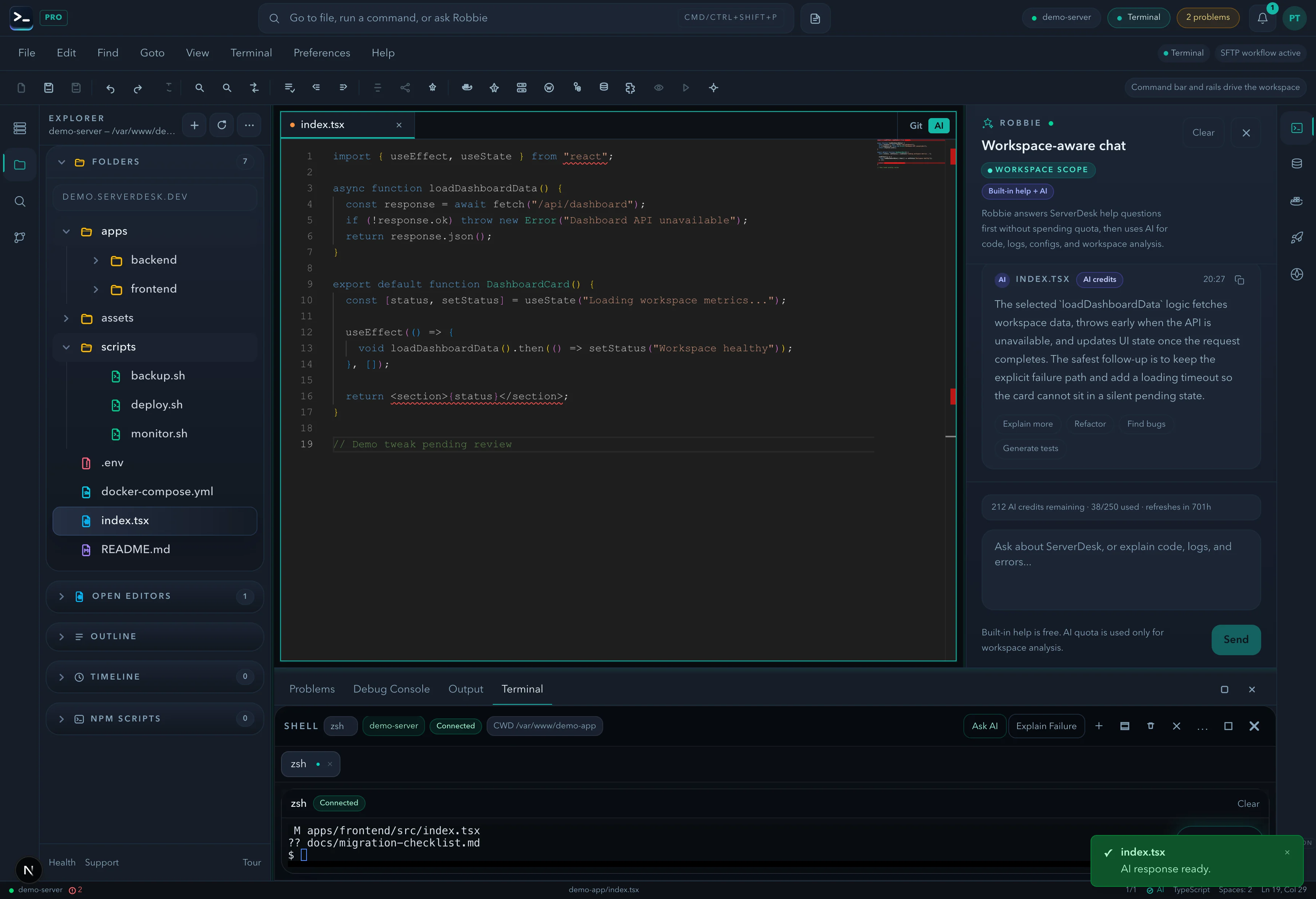
Animated migration demo
A short loop of the Codeanywhere replacement path
Switchers usually want to know three things quickly: can they connect the server they already have, can they verify it in terminal, and can they ask for help without wasting time.
Connect
The connection wizard proves the SSH or SFTP path works before the user commits the new workspace.
Verify
A switcher needs to know the replacement is operating on the real live files, not an empty environment or a generic demo.
Ask Robbie
Migration questions and product guidance stay on the built-in help path so new users can get value immediately.
Active step
Add the existing server and test it before saving
The connection wizard proves the SSH or SFTP path works before the user commits the new workspace.
Connection wizard · legacy-vps
Host reachable on port 22
SFTP path verified at /home/legacy-app
Connection test passed
Migration library
Every guide a Codeanywhere switcher needs in one place
This is the operational handoff after the comparison page: exact migration steps, file-moving guidance, SSH and SFTP setup, Explorer orientation, terminal verification, and Robbie help for inherited codebases.
Migration checklist
Follow the full eight-step move from export through first login, first connection, and first validation.
Open guide →Migration FAQ
Get fast answers on exports, hidden files, SSH reuse, plans, and what happens after the deadline.
Open guide →First 10 minutes
Use the fastest path from signup to a verified Explorer, terminal, and Robbie-assisted workspace.
Open guide →Import and move files
Preserve Git history, uploads, hidden files, and environment-specific assets before switching.
Open guide →SSH and SFTP connection guide
Reconnect the real server you already manage and validate it with the connection test before editing.
Open guide →Explorer guide
Confirm the right root path, keep Open Editors visible, and avoid editing the wrong environment.
Open guide →Terminal guide
Verify the migrated project path with safe commands and read logs before making changes.
Open guide →Robbie migration assistant
Learn what Robbie answers for free and when deeper project or terminal analysis uses AI credits.
Open guide →ServerDesk vs Codeanywhere
| Feature | ServerDesk | Codeanywhere |
|---|---|---|
| Connection model | SSH/SFTP to any real server | Cloud-provisioned containers |
| Status | Active — new signups open | Shutting down July 1, 2026 |
| AI assistant | Workspace-aware (Pro+) | Not included |
| PTY terminal | Full PTY with splits and profiles | Basic terminal |
| Docker management | Built-in Docker Explorer | Via terminal only |
| Database explorer | MySQL, MariaDB, PostgreSQL | Not included |
| Server monitoring | Live CPU, memory, disk, processes | Not included |
| Deployments panel | Saved scripts with live SSH logs | Not included |
| Git / source control | Full stage, commit, push, pull, diff | Basic Git integration |
| Free plan | Yes — 1 server, no credit card | No longer available |
| Mobile browser | Responsive across devices | Limited |
Why ServerDesk
Built for teams who manage real, running servers.
ServerDesk connects directly to your existing infrastructure over SSH and SFTP. That means live files, real databases, running containers, and production configs — not a sandboxed development environment.
No install required
Works in any modern browser, with the best experience on desktop and solid access for lighter mobile tasks.
Your servers, your way
VPS, shared hosting, bare-metal, staging — if it has SSH, ServerDesk can connect.
AI on your actual files
The AI assistant reads your real server files and logs, not a sandboxed repo copy.
No need to rebuild everything
Keep your servers, credentials, and core operating habits. ServerDesk changes the workspace, not the infrastructure.
Transparent pricing
Flat monthly plans by connection count. No per-hour compute billing. Free plan always available.
Support that responds
Human support included on paid plans. No automated chatbot for paid accounts.
Switcher trust
Trust signals buyers can verify
No forced migration
Keep the server you already manage. ServerDesk connects over SSH and SFTP instead of requiring a new hosting platform.
Proof of workflow
Explorer, terminal, support, billing, and migration guidance are public before signup, so switchers can verify the product path.
Support response
Migration, billing, and general support routes publish reply expectations instead of hiding behind vague contact forms.
Launch discount
Use code CODEANYWHERE at checkout for 50% off your first three months on any paid plan. Available until July 1, 2026.
50% off your first 3 months
For Codeanywhere users moving their workflow to ServerDesk. Valid on any paid plan (Starter, Pro, Studio, or Agency). New accounts only. Valid until July 1, 2026.
Coupon code
CODEANYWHERE
Apply this at checkout for 50% off the first 3 months on any paid plan.
Apply at checkout
Frequently asked questions
- Is ServerDesk exactly like Codeanywhere?
- Not exactly — and that is probably a good thing. Codeanywhere was built around cloud containers. ServerDesk connects directly to your real SSH servers instead. If you were using Codeanywhere to manage a live VPS, staging environment, or shared host, ServerDesk is a natural fit. If you were spinning up containers for development, you may also want to look at tools like Gitpod or GitHub Codespaces for that part of the workflow.
- What happens to my files after Codeanywhere shuts down?
- Codeanywhere has stated that users have until June 30, 2026 to export their work. After July 1, access is cut off. We recommend downloading everything now rather than waiting until the last day.
- Do I need to be on a paid plan to connect my server?
- No. The free plan includes one server connection with file browsing, editor access, and terminal. Paid plans add more server connections, AI assistance, and higher-volume operational features.
- Does ServerDesk import Codeanywhere containers directly?
- Not yet. Push to Git or download your Codeanywhere project first, then move it to your server and connect that server to ServerDesk.
- How long does migration take?
- For a straightforward setup — one server, files already in Git — most people are connected and working in ServerDesk within 10–15 minutes. More complex setups with multiple servers and credential management take longer but the process is the same.
- Is the CODEANYWHERE discount available on all plans?
- The 50% discount applies to the first 3 months of any paid plan (Starter, Pro, Studio, or Agency). It is valid for new accounts created before July 1, 2026.
Need help moving from Codeanywhere?
If you are unsure about your setup, can not find specific files, or need help understanding what to migrate, reach out. We will help you get connected.